

Close Menu
The Baylor Lariat
    Facebook X (Twitter) Instagram YouTube LinkedIn
    Trending
    • Board of Regents approves nearly $1 billion operating budget, new AI-centered master’s degree
    • Foster Pavilion to host rising country star Braxton Keith
    • Dog days: Q&A with Wacoan that built hot dog social media brand
    • Country legend Willie Nelson returns after 72 years for night of harmonies, hits
    • Students react to ‘very stressful’ Canvas outage ahead of finals
    • Canvas access to be restored, Friday finals moved to online Thursday
    • Baylor delays finals as nationwide Canvas outage impedes studying
    • SLIDESHOW: IM Claw Cup Championship
    • About us
      • Spring 2026 Staff Page
      • Copyright Information
    • Contact
      • Contact Information
      • Letters to the Editor
      • Subscribe to The Morning Buzz
      • Department of Student Media
    • Employment
    • PDF Archives
    • RSS Feeds
    Facebook X (Twitter) Instagram YouTube LinkedIn
    The Baylor LariatThe Baylor Lariat
    Subscribe to the Morning Buzz
    Saturday, May 30
    • News
      • State and National News
        • State
        • National
      • Politics
        • 2025 Inauguration Page
        • Election Page
      • Homecoming 2025
      • Baylor News
      • Waco Updates
      • Campus and Waco Crime
    • Arts & Life
      • Wedding Edition 2025
      • What to Do in Waco
      • Campus Culture
      • Indy and Belle
      • Leisure and Travel
        • Leisure
        • Travel
          • Baylor in Ireland
      • Student Spotlight
      • Local Scene
        • Small Businesses
        • Social Media
      • Arts and Entertainment
        • Art
        • Fashion
        • Food
        • Literature
        • Music
        • Film and Television
    • Opinion
      • Editorials
      • Points of View
      • Lariat Letters
    • Sports
      • Football
      • Basketball
        • March Madness 2026
        • Men’s Basketball
        • Women’s Basketball
      • Soccer
      • Baseball
      • Softball
      • Volleyball
      • Equestrian
      • Cross Country and Track & Field
      • Acrobatics & Tumbling
      • Tennis
      • Golf
      • Pro Sports
      • Sports Takes
      • Club Sports
    • Lariat TV News
    • Multimedia
      • Video Features
      • Podcasts
        • Don’t Feed the Bears
        • Bear Newscessities
      • Slideshows
    • Sing 2026
    • Lariat 125
    • Advertising
    The Baylor Lariat
    Home»Arts and Life

    iPad apps for school: Notability does the trick for busy students

    Baylor LariatBy Baylor LariatFebruary 5, 2013 Arts and Life No Comments4 Mins Read
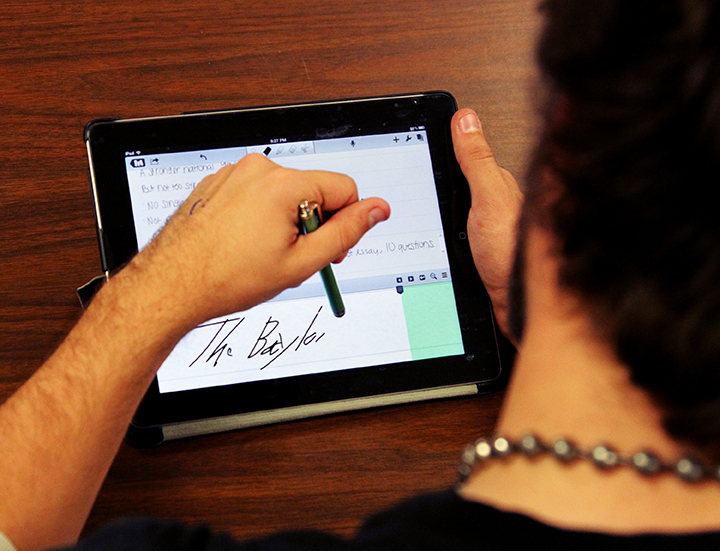
    iPad Illustration Monica Lake | Lariat Photographer
    Share
    Facebook Twitter LinkedIn Pinterest Email

    iPad Illustration Monica Lake | Lariat Photographer
    iPad Illustration
    Monica Lake | Lariat Photographer
    By Linda Nguyen
    A&E Editor

    IPads have become very popular for taking notes during lectures. I use my iPad in the majority of my classes, especially in the ones that don’t involve computers. I could probably get away with carrying only my iPad to class, and I have no doubt that’s probably the case for the majority of other iPad and tablet users.

    When I first got my iPad, I looked all over the Internet for the best apps to help with school. I know I’m pretty nerdy, but hey, an iPad is lighter than carrying around several notebooks. I found several apps recommended by several websites, each with their pros and cons.

    Over the next several weeks, I’m going to review some of the most popular apps that students use in class.

    I am going to start with the one I use for taking notes in class. Notability has served me well this school year. It’s available for $1.99 in the iTunes app store.

    Pros:

    I like this app because it provides me with essentially everything I need to take notes. I’m a huge fan of taking notes by hand and being able to color code important information, vocabulary words and the like. This app allows me to do all of that.

    It has a convenient magnifier that essentially blows up an area of the page so that you can write on it without it looking awkwardly big or like a kindergartner with crayons.

    It has several options for tip size, so it’s easy to get it to a thickness that you’re used to and that you want to use. It prevents me from having to carry around a stack of G2 colored pens everywhere I go.

    The app also allows me to organize my notes into categories and folders which is helpful for organizing everything by subject and semester.

    It’s very easy to import notes from other applications, like Blackboard into Notability to take notes. I especially like the fact that it now supports PowerPoints, so I don’t have to convert every single powerpoint into a PDF before I can mark on it in Notability.

    Cons:

    My biggest complaint about this application is that it does not react well to special symbols.

    In my biochem notes, if my professor uses any kind of special symbol like an arrow or even just a Greek letter, the application converts it to an empty box or tries to convert it to a bigger, bolded version of the letter. It’s pretty frustrating in that respect.

    At first, I thought it was my PDF converter converting the symbols incorrectly, but even with the new in-app converter, the application still does convert the symbols correctly.

    Another qualm I have with this app is its lack of a dimmer. One of the most awkward moments is when you’re in class and the lights are dimmed and then you open your iPad and it blinds your with brightness. I hate when I’m taking notes and then I have to exit the app to dim the screen.

    Some of the apps for books, like iBooks and the Kindle app, allow you to dim the screen within the app; which is more convenient than exiting the application each time.

    Finally, it takes some getting used to. I will admit, when I first got my iPad, I didn’t like it very much. It was difficult to write and I definitely could not write as neatly as I would write with a pen and a sheet of paper. It’s still pretty frustrating to try to write chemical structures or charts in my notes because you need to be able to write tiny and with detail instead of blown up.

    Eventually I got better at using the magnifier to write and take notes, but I really hated my handwriting for several months after I first started using Notability.

    Overall the pros outweigh the cons for me as far as this application goes. It’s not perfect, but I don’t think the iTunes app store is going to come out with a “perfect” note-taking application in the near future.

    It’s difficult to get used to, but if you do it enough, it becomes second nature and you tend to forget about everything that’s wrong with it.

    iPad apps students
    Baylor Lariat

    Keep Reading

    Foster Pavilion to host rising country star Braxton Keith

    Dog days: Q&A with Wacoan that built hot dog social media brand

    Country legend Willie Nelson returns after 72 years for night of harmonies, hits

    Graduate school appeal grows among college students

    Vida y Danza: Dance studio of Mexican heritage

    What to Do in Waco: May 8-14

    Add A Comment

    Comments are closed.

    Recent Posts
    • Board of Regents approves nearly $1 billion operating budget, new AI-centered master’s degree May 21, 2026
    • Foster Pavilion to host rising country star Braxton Keith May 20, 2026
    About

    The award-winning student newspaper of Baylor University since 1900.

    Articles, photos, and other works by staff of The Baylor Lariat are Copyright © Baylor® University. All rights reserved.

    Subscribe to the Morning Buzz

    Get the latest Lariat News by just Clicking Subscribe!

    Follow the Live Coverage
    Tweets by @bulariat

    Facebook X (Twitter) Instagram YouTube LinkedIn
    • Featured
    • News
    • Sports
    • Opinion
    • Arts and Life
    © 2026 ThemeSphere. Designed by ThemeSphere.

    Type above and press Enter to search. Press Esc to cancel.